

In the ever-evolving world of Instagram, Reels have emerged as a key feature, providing users with a dynamic method to post short, entertaining videos.
Although Reels have the potential to be amusing, not everyone is a fan of them!
You may be seeking solutions to block Reels from your Instagram experience if you feel that you are overwhelmed by endless Reels or prefer a more simplified feed.
For the sake of regaining control over your Instagram feed, this tutorial will take you through the procedures necessary to block Reels on Instagram.
Now tell us, do you want to learn about “How to block reels on Instagram?”
If your answer is yes, here is the place you should be! Just be calm and follow us up to the end of the article.
s It Possible to Disable Instagram Reels?
Although it is not feasible to entirely remove Instagram Reels, there are a few different ways in which you can regulate and decrease the amount of time they appear on your feed on Instagram.
🔰 Want to keep your favorite stories forever? Learn how to Download Instagram Story easily and save them in full quality — click to start now!
But we invite you to read the article to continue because we will point to the tips that are practical in this case.
For what reasons do Instagram users decide to block Reels?
The purpose of Instagram Reels is to draw in viewers with engaging, concise content. But the continual barrage of Reels isn’t something that every user enjoys.
To make your feed more personalized, you can disable Instagram Reels if you want to avoid distractions or if you prefer other kinds of content.
You can spend less time scrolling and more time engaging with the stuff you love if you limit your exposure to Reels on Instagram.
🔰 Looking to make your stories more fun and creative? Check out Selfie-Related Instagram Story Ideas for easy ways to spice up your content — click to get inspired!
Methods for clocking Instagram Reels: Step-by-step guide
Instagram Reels are a great way to watch intriguing short videos, but they aren’t perfect for everyone.
In order to customize your Instagram experience according to your preferences, follow these step-by-step instructions to restrict or ban Reels:
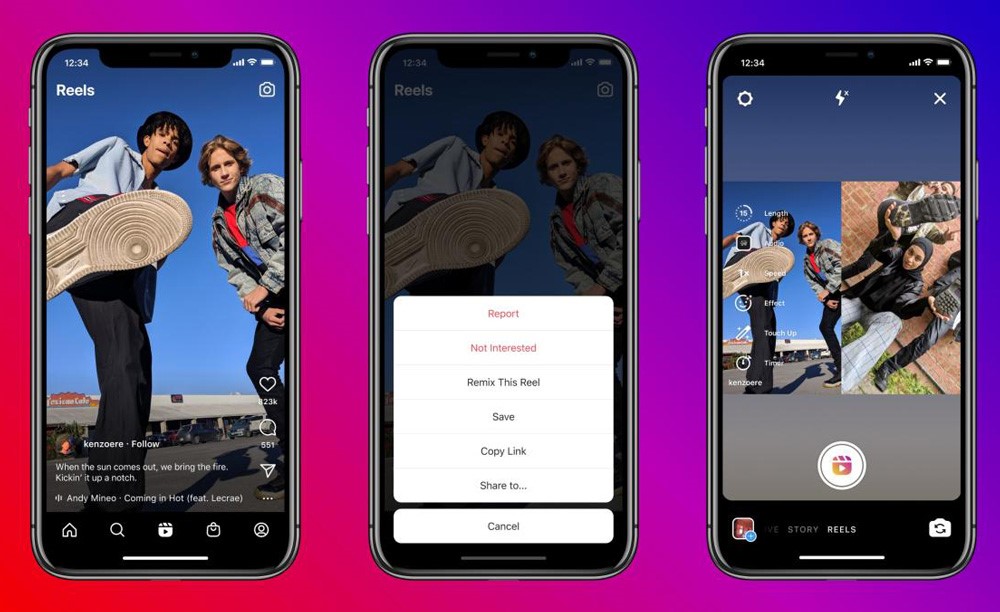
1. Start by making adjustments to your Explore page if you want to personalize your Instagram experience and see fewer Reels. If you find yourself inundated with Reels on Instagram, it might be because of your engagement history since the system proposes them based on your interactions. Select “Not Interested” from the three-dot menu that appears next to a Reel you find unappealing so that Instagram may make better suggestions in the future.
2. To conceal certain Reels from your feed on Instagram, you can press their three dots (•••) and choose “Hide.” Unfortunately, there isn’t a straightforward way to block Instagram reels from your feed altogether.
3. You will no longer see that Reel in your Instagram feed, but related content may still show up. For a more long-term solution, you can utilize Instagram’s mute function to block Reels from certain individuals permanently. Just go to their profile, choose “Following,” and then choose “Mute” for all of their posts, including Reels.
4. Another way to make sure your interests are prioritized over Reels on Instagram is to engage with the videos you like, whether it’s images, Stories, or IGTV videos. By touching the three dots (•••) and choosing “Report,” you can delete the Reel and help improve content suggestions for everyone if you come across improper or irrelevant ones.
5. Instead of the app, use a browser to prevent Reels on Instagram. The web version does not push Reels to Explore feed, unlike the app. This solution works with Firefox, Safari, Chrome, and others. Log in to your account on the browser to see your favorite stuff without Reels. Unfortunately, the online version’s design and experience are less seamless than the app’s. Open a mobile browser, visit Instagram, login, and enjoy Instagram without Reels.
6. Many Instagram users have tried to deactivate Reels in Settings, but they cannot. The simplest method to prevent Reels is to use earlier software accessible from many sources. Allow unknown sources in Google Play to get the old Instagram. Disable “Enable auto-update” to stop updates. Download Instagram before Reels in 2020. This keeps the app updated just when you want.
7. Finally, if you want to customize your Instagram feed to your liking, consider using features like Stories and regular picture postings.
Methods for Blocking Reels with third-party Applications
There are third-party applications that are meant to improve your experience on Instagram, and they are available to those who want more control. It is possible to organize and filter content with the use of several programs, including Instagram Reels.
The built-in features of Instagram are the major tools you have at your disposal; however, these applications can provide you with extra customization choices to fine-tune your feed on Instagram.
A guide to delete your own Instagram Videos
The procedure for deleting an Instagram video from your account is straightforward.
⚡ You can access your Instagram profile from the app’s main screen by touching the profile icon located in the lower right corner.
⚡ Then, locate the video Reel you want to delete by scrolling through your postings.
⚡ Find the video you want to watch, touch on it to open it, and then hit the three dots (•••) in the upper right corner.
⚡ When you press the “Delete” button, a menu will pop up. At the screen, choose and then confirm your selection.
⚡ After that, the video will no longer be shown on your profile.
🔰 Need a simple way to save photos you love on Instagram? Try our Instagram Photo Downloader and keep your favorite pictures in just a few clicks — click to start!
Make sure you keep up with Instagram’s updates.
Instagram is constantly rolling out new features and modifying its algorithms.
Maintain a level of awareness of any new devices or configurations that can provide improved methods for managing Instagram Reels and other sorts of content.
It is important to check Instagram’s settings and updates on a regular basis so that you can make any necessary adjustments to your preferences.
Conclusion
Using Instagram’s Block Reels feature allows you to personalize your experience so that it precisely matches your tastes.
Whether you want to lessen the number of distractions you encounter or want to experience a different kind of information, the procedures that have been discussed above will assist you in regaining control of your feed.
It is important to keep in mind that Instagram is intended to be a personal experience, so go ahead and make it your own.
Are Instagram Reels taking up too much space on your Instagram feed? Are you familiar with these techniques for blocking or concealing them?
Feel free to share your ideas and experiences in the comments section below about “How to block reels on Instagram?”
What is your preferred method for personalizing your experience on Instagram?