Instagram Photo Downloader
Online 4ksaver is well-respected for its user-friendliness, speed, and dedication to providing a safe, cost-free way to save Instagram posts from many accounts without registration.
Please wait
No watermark
HD quality
Fast download
Easily editable
Any format
What is an Instagram photo downloader?
In addition to showcasing beautiful adventures and joyous festivities, Instagram also features health journeys, delicious food, fitness routines, fashion trends, and sports achievements.
Some photos stand out among this varied mix due to their breathtaking quality, exciting topics, and fascinating subjects; you can download and save the Instagram photos as a background on your phone or as inspiration for your work.
If you are here, you know that Instagram does not allow you to download and save photos from this app directly. So, for this purpose, we present 4ksaver.com. It also helps users save stories, highlights, IGTV material, subtitles, and user profiles.
Online 4ksaver is well-respected for its user-friendliness, speed, and dedication to providing a safe, cost-free way to save Instagram posts from many accounts without registration.
Those interested in learning more about how 4ksaver might enhance your Instagram archiving tools will find additional information in the next part.
A practical approach for downloading Instagram photos by 4ksaver
Here are the steps to download an Instagram picture using 4ksaver, a program for preserving Instagram content:
1
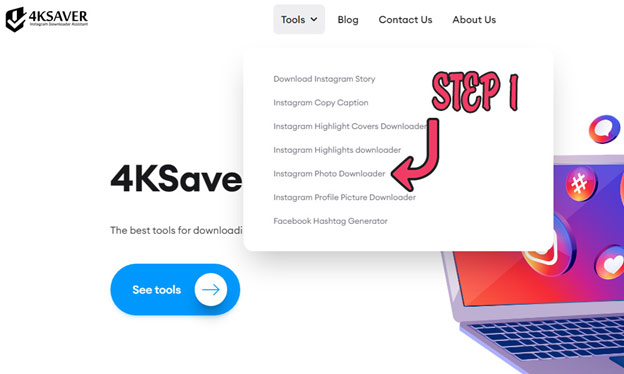
First, launch 4ksaver.
Visit the 4ksaver webpage in your selected browser. This tool works on desktop and mobile devices so that you can use it anywhere.
2
Second, find an Instagram photo to download.
Browse Instagram and choose the picture you want. Download from a public account since private accounts may need additional permissions.

3
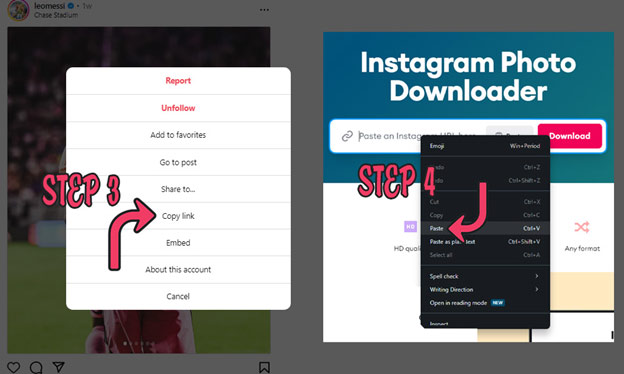
Third, copy & paste the photo URL.
Copy the Instagram post URL after finding the picture. Click on the three dots above or below the post and choose "Copy Link," or copy the URL from the address bar if you're using Instagram on a web browser. Then, Return to 4ksaver and enter the copied URL into the entry form.
4
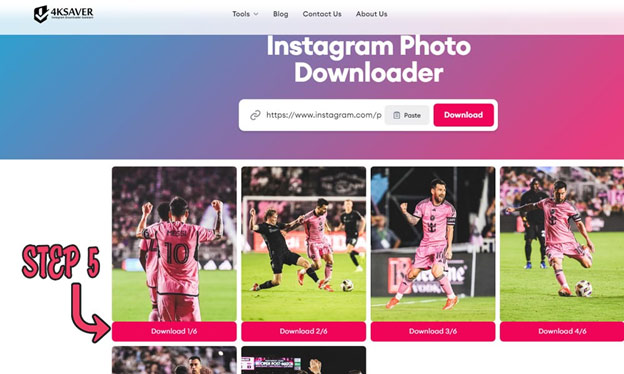
Fourth, download a photo with 4ksaver.
See a prompt or button that shows “Download,” “Save,” or “Start.” Click to start downloading the Instagram photo. You will see a download button when the program processes your request. After downloading, the picture is in your device's download folder or gallery.
Our Tools

Frequently Asked Questions
It is perfectly legal to utilize 4ksaver.com to download Instagram photos. You can trust and use it without worrying that someone would accuse you of using it for personal photographs.
To download photos from public accounts on Instagram, you don't need to register or follow the individual; you can copy the post's URL.
Yes, all of the features available on the 4ksaver.com website are free of charge to download.
There is no need to be concerned; Instagram will not inform the picture's owner if you save their photo.
Where stored photographs go after downloading depends on your device. 4ksaver users can locate them in their browser's Download area. This utility lets you discover reserved pictures in your phone's photos or gallery app.